Markdown语法
乐乎乐乎支持标准 Markdown 语法以及 Pandoc Markdown1 语法。
基础语法
所有的 Markdown 需要设置 Front Matter 变量,至少指定 title 和 date 两个变量。 title为文章标题,date为发布日期。日期格式推荐为YYYY-MM-DD,文章会按照日期从近到远排序。
乐乎还支持很多扩展语法以方便大家创作。
图片
设置图片宽度需要使用 pandoc 扩展格式:
{width=100px}pandoc 会自动生成<figure>元素,并将alt填入<figcaption>。
乐乎支持在 Markdown 直接嵌入图片数据,比如嵌入一个简单的 SVG 圆形:
{ width=100px }
表格
乐乎支持 gfm 表格扩展,比如:
| Middle | Default | Right |
| :----: | ------- | ----: |
| bar    | baz     | foo   |
展示效果:
| Middle | Default | Right |
|---|---|---|
| bar | baz | foo |
脚注
乐乎支持脚注,比如:
hello lehu[^lehu]

[^lehu]: lehu is a blogging platform

lehu is based on syncthing[^st]

[^st]: syncthing is p2p synching tool
引擎会自动为脚注编号,比较方便。
而且脚注部分不需要写到文章末尾,可以就近引用,剩下的事情 pandoc 会自动处理💯
hello lehu2
lehu is based on syncthing3
删除线
乐乎支持 gfm 删除线扩展:
~~Hi~~ Hello, ~there~ world!展示效果:
Hi Hello, there world!
软换行
Markdown 默认使用两个空行进行分段。文章中的单个换行符会被转换成空格。这就是所谓的软换行。软换行在英文中完全没有问题,甚至很有必要:
hello
world
会转换成:
hello world
但如果是中文,则会在汉字之间插入空格。乐乎对这种情况做了优化,如果换行符两边都是汉字就不会插入空格:
乐
乎
会被渲染成
乐乎
大家可以在 Markdown 中尽情换行😄
标题列表
乐乎会自动为文章生成标题列表,但只会显示h1-h3三级标题。有些情况不想展示标题列表,则可以在 Front Matter 声明toc变量,并将其设置为false。
任务列表
乐乎支持 gfm 任务扩展,比如:
- [x] foo
  - [ ] bar
  - [x] baz
- [ ] bim
展示效果:
自动链接
乐乎支持将 URL 自动转换为链接:
<https://taoshu.in/>
<hi@lehu.in>
展示效果:
原生代码
乐乎的特色之一是支持嵌入各种前端代码。
💡Tip特别适合发布交互式 Web 端内容,比如这篇文章用 CSS 绘制小鸟按钮。
比如使用 div + css 画一个圆角矩形:
<div id="demo-1" onclick="alert('hello')"></div>
<style>
#demo-1 {
  width: 100px;
  height: 100px;
  margin: 0 auto;
  background: #f4cf47;
  border: solid 3px #000;
}
</style>
显示效果:
点击一下还能执行 JavaScript 😄
数学公式
乐乎的数学公式基于 MathML 实现。
✏️Note面向学术写作群体。
$a^2 + b^2 = c^2$$v(t) = v_0 + \frac{1}{2}at^2$$\gamma = \frac{1}{\sqrt{1 - v^2/c^2}}$$\exists x \forall y (Rxy \equiv Ryx)$$p \wedge q \models p$$\Box\diamond p\equiv\diamond p$$\int_{0}^{1} x dx = \left[ \frac{1}{2}x^2 \right]_{0}^{1} = \frac{1}{2}$(@foo) $e^x = \sum_{n=0}^\infty \frac{x^n}{n!} = \lim_{n\rightarrow\infty} (1+x/n)^n$注意最后一个公式前面的(@foo),这是 pandoc 的引用标记。pandoc 会给所有带标记的公式编号,还会把后文中出现的标记自动替换为公式编号。内容中的(@foo)会被替换为(1)。
矢量绘图
基于 pandoc 强大扩展能力,乐乎支持直接在 Markdown 中通过代码精确绘制矢量图,最终会以 SVG 格式输出到浏览器。
✏️Note面向学术写作群体。
乐乎支持 Graphviz/Asymptote/LaTeX 三种绘图引擎。我也考察过 Mermaid,但该项目只能在浏览器端运行,无法直接在服务端输出 SVG 图片,只能作罢。
所谓绘图,就是把对应的描述代码写到特殊的代码块,并分别将代码语言声明为 dot.svg/asy.svg/tex.svg。注意,这里都添加了 .svg 后缀。如果不加该后缀,乐乎会直接展示对应的源码。矢量图描述代码更新后对应的 SVG 也会自动更新。
乐乎支持在源码注释中设设置图片的标题、宽度等属性。具体请参考 LaTeX 部分示例源码。当前支持自定义的属性有:
fig-cap图片标题,设置后会生成<figure>元素width/height图片宽高style图片样式 CSS
Graphviz
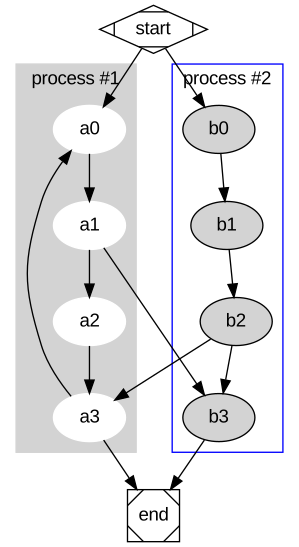
Graphviz 最简单,它使用一种叫 DOT 的描述语言绘图。Graphviz 通常用来绘制网状图,表达各节点之间的关系。
下面是一张简单的流程图4:
下面这张记录 LR(0) 状态转换5:
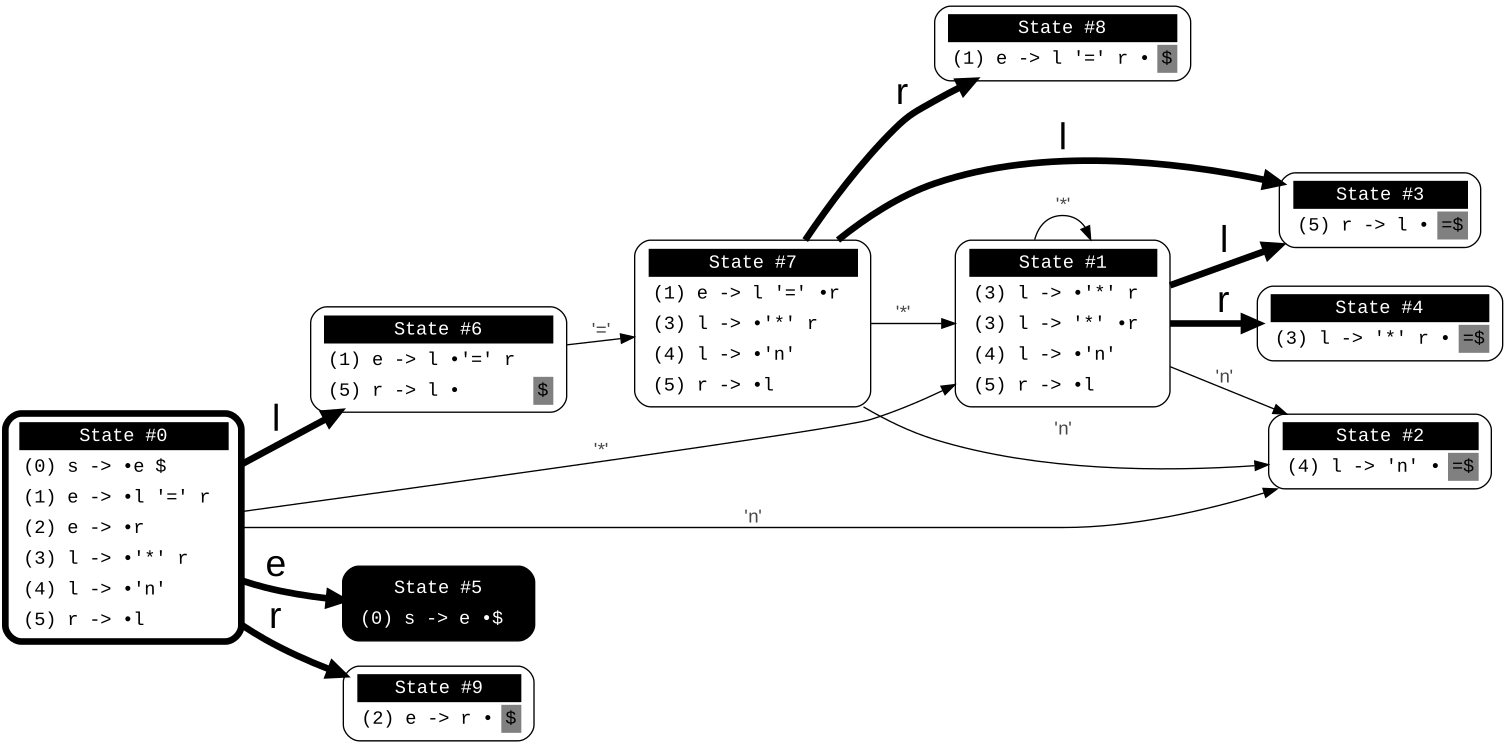
Graphviz 很强大,但它使用的 DOT 语言只是一种静态描述语言,只能表达图的结构以及各部分之间的关系,不具备编程能力。
有时我们希望通程序动态输出图片,比如绘制某函数在特定区间的图象等。这就需要用到第二款绘图工具 Asymptote。
Asymptote
Asymptote 是一种专门用于矢量绘图的编程语言,语法跟 C++ 相似,底层使用 LaTeX 作为绘图引擎。Asymptote 能做的事 LaTeX 都能做。但就绘图而言,Asymptote 更专业,更强大、也更方便。
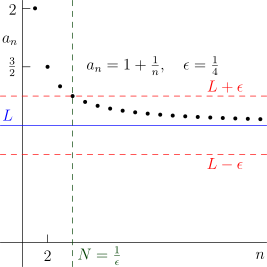
下图展示数列极限6:
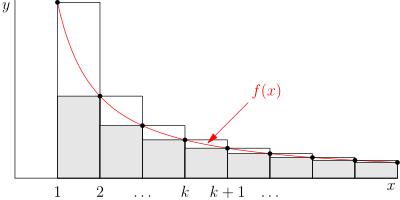
下图展示积分计算7:
但无论 Asymptote 多么厉害,它只是 LaTeX 的一个壳。很多时候直接使用 LaTeX 会更灵活。
LaTeX
使用 LaTeX 语法时需要将代码类型声明为tex.svg,而且不能添加documentclass导言信息。
然后就可以使用 LaTeX 绘制各类图形了。其实也不局限于图形,只要是 LaTeX 支持,乐乎就能将其转换成 SVG 展示。
下面是用 PGF/Tikz 绘制的饼状图:
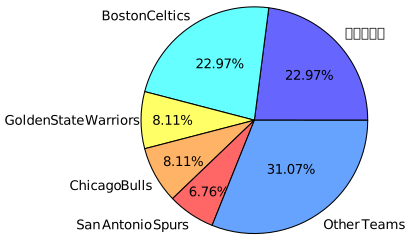
对应的源码:
%%| fig-cap: 使用 PGF/Tikz 绘制的饼状图
%% 默认会删除 SVG 中内嵌的字体描述信息,以减少体积
%% 如果展示有问题则可以指定内嵌字体
%%| opt-embed-font: true
\usepackage{xeCJK}
\usepackage{pgf-pie}

\begin{document}

\begin{tikzpicture}

\pie{22.97/洛杉矶湖人,
    22.97/Boston Celtics,
    8.11/Golden State Warriors,
    8.11/Chicago Bulls,
    6.76/San Antonio Spurs,
    31.07/Other Teams}

\end{tikzpicture}

\end{document}
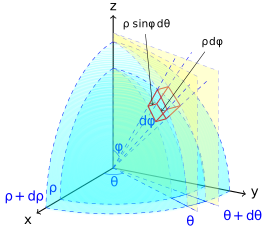
下图使用 TikZ 绘制球面坐标微分原理图8:
我们甚至还能绘制动画。比如下图给出太阳、地球和月球的运行关系。
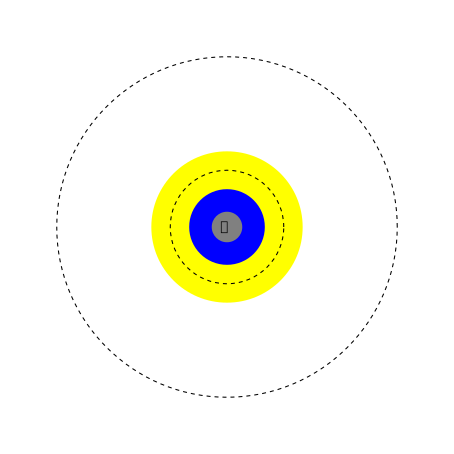
对应的源码如下9:
%%| fig-cap: 日-地-月系统
\usetikzlibrary{animations}
\usepackage{xeCJK}
\begin{document}
\begin{tikzpicture}[
    animate/orbit/.style 2 args = {
        myself:shift = {
          along = {
            (0,0) circle [radius=#1]
          } sloped in #2s/10,
          repeats }} ]

 \node[circle, fill = yellow, minimum size=4cm] {太阳};
 \draw[dashed, thick] (0,0) circle (4.5cm);

 \begin{scope}[animate={orbit={4.5cm}{365}}]
   \node[circle, fill = blue, minimum size=2cm]{地球};
   \node[circle, fill = gray, animate={orbit={1.5cm}{28}}] {月};
   \draw[dashed, thick] (0,0) circle (1.5cm);
 \end{scope}

 \useasboundingbox (-5,-5) (5,5);
\end{tikzpicture}
\end{document}
最后给一个不是图的例子。下面是用 LaTeX 绘制的表格,也会被渲染成 SVG 图片:
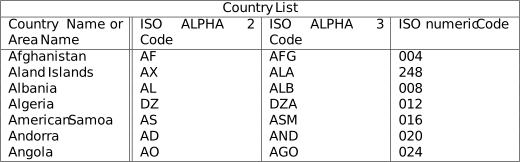
对应的 LaTeX 源码如下:
\usepackage{multirow}
\begin{document}
\begin{tabular}{ |p{3cm}||p{3cm}|p{3cm}|p{3cm}|  }
 \hline
 \multicolumn{4}{|c|}{Country List} \\
 \hline
 Country Name or Area Name& ISO ALPHA 2 Code &ISO ALPHA 3 Code&ISO numeric Code\\
 \hline
 Afghanistan   & AF    &AFG&   004\\
 Aland Islands&   AX  & ALA   &248\\
 Albania &AL & ALB&  008\\
 Algeria    &DZ & DZA&  012\\
 American Samoa&   AS  & ASM&016\\
 Andorra& AD  & AND   &020\\
 Angola& AO  & AGO&024\\
 \hline
\end{tabular}
\end{document}
GitHub Alerts
乐乎支持 GitHub 的 Alerts 语法,样式跟 GitHub 略有区别。
> [!NOTE]
> Highlights information that users should take into account, even when skimming.

> [!TIP]
> Optional information to help a user be more successful.

> [!IMPORTANT]
> Crucial information necessary for users to succeed.

> [!WARNING]
> Critical content demanding immediate user attention due to potential risks.

> [!CAUTION]
> Negative potential consequences of an action.
渲染效果如下:
✏️NoteHighlights information that users should take into account, even when skimming.
💡TipOptional information to help a user be more successful.
⚠️ImportantCrucial information necessary for users to succeed.
⛔WarningCritical content demanding immediate user attention due to potential risks.
🚨CautionNegative potential consequences of an action.
未完待续……
https://garrettgman.github.io/rmarkdown/authoring_pandoc_markdown.html↩︎
lehu is a blogging platform↩︎
syncthing is p2p synching tool↩︎
https://tikz.net/differential-of-volume-spherical-coordinates/↩︎
基于 https://tikz.dev/tikz-animations#sec-26.1 并添加图形描述↩︎